Images 3 min read
Choose the Right Image Format
Learn when to use JPG, PNG, WebP, HEIC, SVG, or PDF, and avoid files that are too large, blurry, or hard to open.
Read guide Images 3 min read
Compress Images for Faster Web Pages
Reduce image dimensions and file size without making photos, screenshots, or graphics look needlessly blurry.
Read guide Product photos 4 min read
Prepare the photos your listing needs
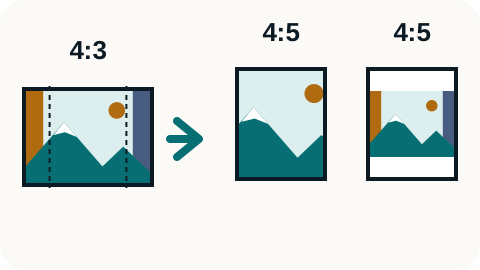
Choose the right frame for a Mercado category, check the actual crop, and keep Etsy listing previews separate from the digital files buyers receive.
Read guide PDFs and documents 3 min read
Redact Private Information From a PDF
Use solid redaction blocks for private information, understand how the PDF pages are flattened, and check the saved copy before sharing it.
Read guide PDFs and documents 3 min read
Put PDF Pages in the Right Order
Reorder, rotate, remove, or extract PDF pages. Keep the original and check the page order in the saved copy.
Read guide PDFs and documents 3 min read
Move a Selectable PDF Table Into Excel
Extract a table that contains selectable PDF text, draw a tight selection box, and check the spreadsheet for shifted or missing values.
Read guide PDFs and documents 4 min read
Make your PDF fit the upload limit
Choose one smaller image-based PDF or measured PDF parts, then check readability and the receiving form’s file-count and size rules.
Read guide PDFs and documents 3 min read
Extract Text From a Scanned PDF
Use OCR to read scanned PDF pages, check names and numbers against the source, and download the recognized text as a TXT file.
Read guide File troubleshooting 3 min read
Turn Images Into a Clear PDF
Convert one JPG, PNG, or HEIC image at a time into a one-page PDF, then merge the checked pages into one ordered document if needed.
Read guide PDFs and documents 4 min read
Choose JPG or PNG for PDF Pages
Choose a basic JPG or PNG export, or render selected PDF pages to JPG against a byte limit. Check actual pixels, white backgrounds and text readability.
Read guide Images 4 min read
Make a HEIC photo work where you need it
Choose a native Apple export, a simple JPG copy or a named application preset. Keep the original and check the resulting file before sharing.
Read guide PDFs and documents 3 min read
Fix a PDF That Will Not Upload
Find the likely cause of a failed PDF upload, including file size, password protection, damage, filename issues, or unsupported document features.
Read guide Images 3 min read
Make WebP and AVIF Images Easier to Share
Keep modern image formats where they work, and create a JPG or PNG copy when an app, recipient, or upload form cannot open them.
Read guide PDFs and documents 3 min read
Know What to Expect From PDF to Word
Convert a PDF into an editable document, use the converter’s built-in OCR for scanned pages, and check the Word file for layout changes.
Read guide Video 3 min read
Make a Smaller GIF From a Video Clip
Trim the clip in a separate step, choose a smaller GIF width and frame rate, then check motion, text, color, and file size.
Read guide Audio 3 min read
Save a Video’s Audio as MP3
Convert an MP4 or MOV video to MP3 with the tool’s fixed settings, then check the result for duration, silence, noise, and clipping.
Read guide Images 6 min read
Resize a photo or signature for an upload form
Match a form’s JPG format, pixel dimensions, and file-size range in one pass. Check the saved copy for readable details before submitting it.
Read guide Base64 and embedding 5 min read
Use Base64 Images Without Breaking the File
Encode small images as Base64, add the correct data URL prefix when needed, and avoid oversized CSS, HTML, or JSON payloads.
Read guide File troubleshooting 4 min read
Fix Files Rejected by ChatGPT, Claude, or Gemini
Find out why an AI upload failed, fix the file if needed, and check whether the problem is with your account or the service.
Read guide Product photos 5 min read
Check print sizes before selling a digital download
Find which print sizes your artwork can support, preview the crop, and check the files you will deliver to buyers.
Read guide No guides match that search. Try a shorter phrase or choose “All guides.”