Use the tool
Open Convert to PDF
Turn one supported image into one PDF with the general converter.
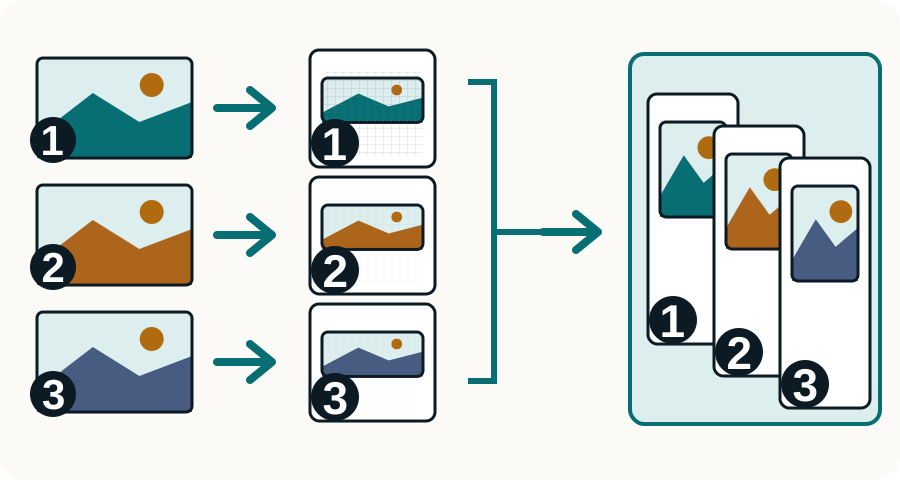
Convert one JPG, PNG, or HEIC image at a time into a one-page PDF, then merge the checked pages into one ordered document if needed.

Each JPEGConvert image-to-PDF tool turns one image into one PDF. Convert and check each image separately, then use Merge PDF to combine the one-page files in the right order.
Prepare each image, convert it to a one-page PDF, and merge only the pages you have checked.
Rotate or crop the source first and make sure its text and signatures are readable.
Use JPG to PDF, PNG to PDF, HEIC to PDF, or the general Convert to PDF page for that file.
Open the result and inspect orientation, edges, small text, color, and file size.
Convert the other images, then add the finished PDFs to Merge PDF in the order you want.
The converter cannot restore detail missing from a dark, blurry, sideways, or badly cropped image.
Turn one supported image into one PDF with the general converter.
The current JPEGConvert image-to-PDF pages accept one source image and create one PDF result.
Merge PDF is a separate step for making one ordered document from several one-page results.
The JPG-to-PDF and PNG-to-PDF tools each convert one selected image into a one-page PDF. Use Merge PDF to combine the downloaded PDFs into one document.
JPG is practical for photos and scans. PNG can preserve transparency or sharp flat graphics, but may create larger files. Use the clearest suitable source you have.
Not in the current image-to-PDF tools. Convert one image at a time, check each result, then combine the one-page PDFs with Merge PDF.
Not in the current converter. Prepare the source image first, then inspect the one-page PDF to confirm that no important edge was cut off.
Resize very large images before combining them and use suitable image compression. Do not lower quality so far that text or required details become unreadable.
Choose the tool for the change your file needs.