Printable art and digital downloads

Check print sizes before selling a digital download

Find which print sizes your artwork can support, preview the crop, and check the files you will deliver to buyers.
5 min read Updated Sep 5, 2026
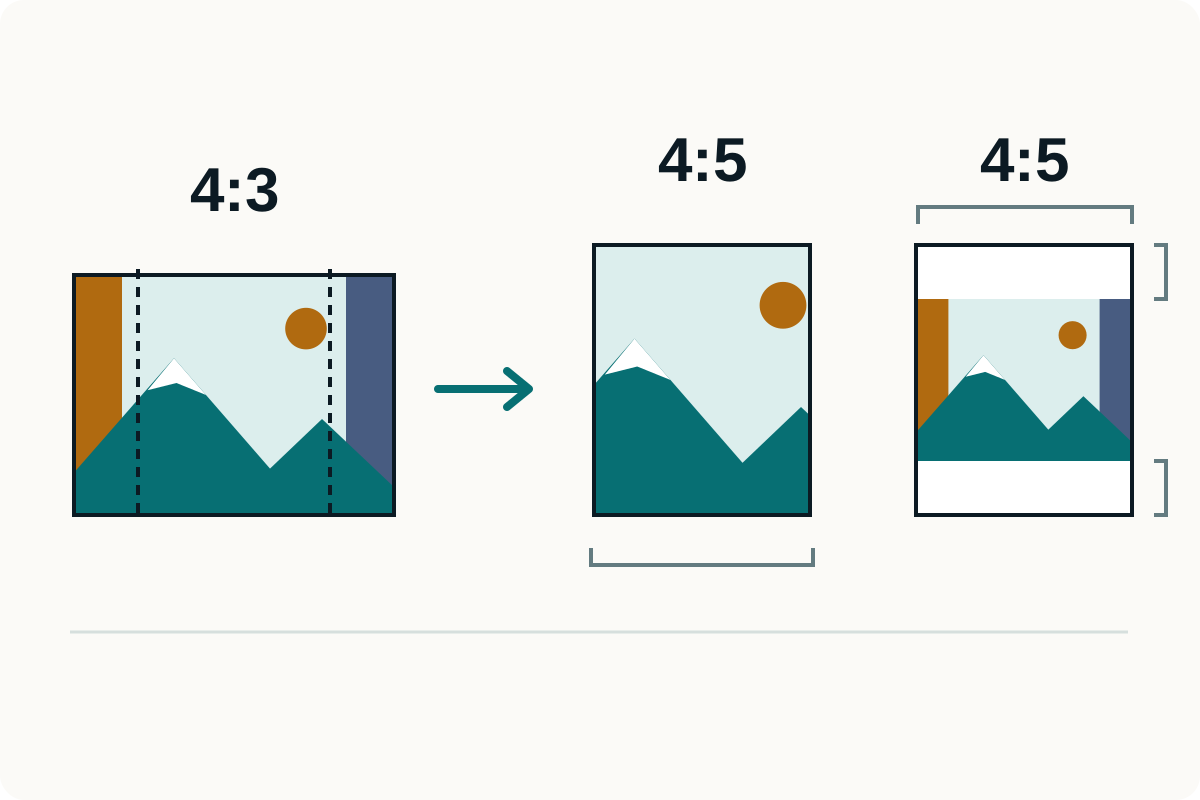
The same landscape fills a taller print by cropping both sides, or keeps its full composition with white borders above and below.
Quick answer

Pixels and cropping set the usable print size

Divide the pixels you will actually print by the print size in inches. A 2400 × 3000 pixel image fills an 8 × 10 inch print at 300 PPI. A different aspect ratio needs cropping or margins. Etsy separately allows up to five digital files, each at most 20 MB; that is a delivery limit, not a print-quality standard.

Best for
Printable-art sellers and buyers checking a JPG, PNG, or WebP before ordering a print.
Start with
Print Size Checker
Do this first

Check the file the buyer will receive

Use this order to get a clean result without extra work.

  1. 1

    Read the original pixel dimensions

    Use the full-resolution artwork, not a listing thumbnail or screenshot. The checker can read a JPG, PNG, or WebP, or you can enter dimensions yourself.

  2. 2

    Enter the intended print size

    Choose inches or centimeters and a target PPI. Start at 300 PPI for a close-viewed print, then follow the print provider’s requirements.

  3. 3

    Compare margins with cropping

    Check the preview for lost borders, lettering, signatures, or other details. A passing pixel calculation does not establish that the crop looks right.

  4. 4

    Export and check each delivered version

    Keep the master. Inspect the actual output files, names, and bytes, then describe the sizes and ratios included in the listing.

01

Calculate PPI from the pixels you have

PPI means image pixels per inch of print. Adobe describes 300 PPI as a common target for high-quality prints viewed closely; larger work viewed farther away may use less. The print provider and the artwork still matter.

  • At 300 PPI: 8 × 10 inches needs 2400 × 3000 pixels; 11 × 14 needs 3300 × 4200; 16 × 20 needs 4800 × 6000.
  • At 300 PPI: 18 × 24 inches needs 5400 × 7200 pixels; 24 × 36 needs 7200 × 10800. These are calculated dimensions, not a requirement imposed by Etsy.
  • For centimeters, divide the physical measurement by 2.54 before calculating PPI. Changing a resolution label without resampling does not create pixels.
  • The checker previews files up to 40 MB and 40 million pixels. For larger files, enter their pixel dimensions manually; that checks the geometry without decoding the artwork.
Use the tool

Open Print Size Checker

Check effective PPI and compare a center crop with keeping the whole image.

02

A different ratio changes what fits on the paper

An 8 × 10 print is 4:5, an 11 × 14 print is 11:14, and an 18 × 24 print is 3:4. One uncropped file cannot fill all three shapes without margins or distortion. Prepare each promised crop from the master and inspect its edges.

  • Keep the whole image: preserve every edge and leave unprinted space where the ratios differ.
  • Fill the paper: crop some of the image. The checker models a center crop; use Crop Image to position the actual crop yourself.
  • Do not stretch artwork to force a ratio. Be especially careful with text, circles, faces, and decorative borders.
  • The checker reports effective PPI from visible pixels after cropping. It does not export a crop, rewrite DPI metadata, or simulate printer colors.
Compare the framing

Keep the whole image or fill the print area

This illustration uses a 4:3 source and a 4:5 print area. The downloadable numerical example below uses a different ratio.

A landscape source image fills a portrait print by losing its side bands, or fits wholly with white space above and below.
Illustrated 4:3 source to 4:5 print: a center crop removes both sides; fitting keeps the whole image with top and bottom margins.
01
Start from the master
Use its full-resolution pixel dimensions and inspect the edges.
02
Choose the final ratio
Compare a crop with margins before exporting a deliverable version.
03
Check the actual export
Calculate its effective PPI at the intended physical print size.
Illustrated framing choices. Check your own artwork after exporting each aspect ratio.
03

Try the same 1200 × 800 image three ways

Our downloadable pixel ruler makes the arithmetic visible. At 6 × 4 inches it gives 200 PPI. On 4 × 4 inch paper, keeping the whole image produces a 4 × 2⅔ inch image at 300 PPI with margins. Filling that square crops the source to 800 × 800 pixels, gives 200 PPI, and removes one-third of its area.

  • These are deterministic geometry calculations with a synthetic test image. They are not photographs, physical print tests, or a guarantee of acceptable sharpness.
  • Inspect the source and saved calculations below, or reproduce them in Print Size Checker. Use your own artwork and inspect a proof before promising a large print.
Reproduce the calculation

Same source pixels, different print results

The linked data records the inputs, crop geometry, PPI, source hash, and calculation implementation hash.

Calculated on 5 September 2026. PPI measures pixel density at a stated print size; it does not measure the detail or quality of the original artwork.
04

Check Etsy’s delivery limits separately from print quality

Etsy’s digital-listing documentation permits up to five uploaded files, each no larger than 20 MB. Its supported digital formats include JPG/JPEG, PNG, PDF, and ZIP. These are the files a buyer receives, separate from your listing photos.

  • Make every delivered file useful: label the ratio, included sizes, and whether margins are expected. A ZIP can group versions, but the ZIP itself must fit the upload limit.
  • Buyers see the uploaded filenames. Etsy limits them to 70 characters using letters, numbers, periods, underscores, and hyphens; use clear names such as artwork-4x5-2400x3000.jpg.
  • The linked Etsy page does not define MB in bytes. A conservative check is at most 20,000,000 bytes per file, followed by a real upload check.
  • Compression may remove detail; lowering pixel dimensions reduces the supported print size. After either change, check the final export again. A smaller file is not automatically the same printable product.
Quick questions

Questions about printable-art files

Does Etsy require digital downloads to be 300 DPI?

The cited Etsy digital-listing requirements specify supported formats, five files, and 20 MB per file. They do not impose a universal 300 PPI print requirement. Choose a pixel density for the intended print, viewing distance, and print provider.

Will changing 72 DPI to 300 DPI make my image sharper?

Changing a resolution label without resampling keeps the same pixels and changes the physical size associated with them. Resampling creates more or fewer pixels, but does not recover missing detail from the original.

Can I use the same file for 8 × 10 and 11 × 14 prints?

Those print sizes have different aspect ratios. You can keep the whole image with margins, or make a separate crop. Check whether anything important disappears and calculate PPI from the pixels retained.

Does the checker create my printable download pack?

No. It checks geometry and previews cropping or margins. Export your deliverable files from your editor, inspect each final file, and describe the included ratios and sizes accurately.

Remember this

The short version

  • Check the final exported pixels at the promised print size.
  • Review each aspect ratio; cropping can remove important content and lower effective PPI.
  • Treat Etsy’s file-delivery limits and print quality as separate checks.
Ready to work

Open the tool you need

Choose the tool for the change your file needs.

(function() { const title = document.querySelector('h1'); const actionRegion = document.querySelector('.action-container, .action-body'); if (!title || !actionRegion || title.querySelector('.tool-hero-mark')) return; const path = window.location.pathname.replace(/\/$/, ''); if (!path || path === '/' || path.startsWith('/converters') || path === '/about' || path === '/contact' || path === '/support' || path === '/privacy-policy') { return; } const lowerKey = path.replace(/^\/(video|audio)\//, '').replace(/^\//, '').toLowerCase(); if (!lowerKey) return; let category = 'image'; if (path.startsWith('/video/')) category = 'video'; if (path.startsWith('/audio/')) category = 'audio'; const isUtility = lowerKey.includes('ascii') || lowerKey === 'check-my-file' || lowerKey === 'prepare-for-ai' || lowerKey.includes('resizer') || lowerKey.includes('metadata') || lowerKey.includes('compress') || lowerKey.includes('base64') || lowerKey.includes('background') || lowerKey.includes('crop') || lowerKey.includes('watermark') || lowerKey.includes('remove-pages') || lowerKey.includes('unlock') || lowerKey.includes('protect') || lowerKey.includes('editor') || lowerKey.includes('excel') || lowerKey.includes('upscale') || lowerKey.includes('merge') || lowerKey.includes('split') || lowerKey.includes('ocr') || lowerKey.includes('sign') || lowerKey.includes('trim') || lowerKey.includes('favicon'); if (category === 'image' && isUtility) category = 'tool'; const labelMap = { jpg: 'JPG', jpeg: 'JPEG', png: 'PNG', gif: 'GIF', svg: 'SVG', pdf: 'PDF', heic: 'HEIC', jfif: 'JFIF', webp: 'WEBP', bmp: 'BMP', ico: 'ICO', word: 'DOCX', docx: 'DOCX', excel: 'Excel', xls: 'XLS', xlsx: 'Excel', mp4: 'MP4', mov: 'MOV', avi: 'AVI', mp3: 'MP3', aac: 'AAC', flac: 'FLAC', wav: 'WAV', webm: 'WEBM', cr2: 'CR2', arw: 'ARW', nef: 'NEF', raf: 'RAF' }; const formatLabel = (value) => labelMap[value] || value.toUpperCase(); function getFormatMeta(key) { if (key === 'check-my-file') { return {primary: 'Check', secondary: 'File', connector: 'dot'}; } if (key === 'prepare-for-ai') { return {primary: 'Prepare', secondary: 'AI', connector: 'dot'}; } const directMatch = key.match(/^([a-z0-9]+)-to-([a-z0-9]+)$/); const convertMatch = key.match(/^convert-([a-z0-9]+)-to-([a-z0-9]+)$/); const convertToMatch = key.match(/^convert-to-([a-z0-9]+)$/); if (directMatch) { return {primary: formatLabel(directMatch[1]), secondary: formatLabel(directMatch[2]), connector: 'arrow'}; } if (convertMatch) { return {primary: formatLabel(convertMatch[1]), secondary: formatLabel(convertMatch[2]), connector: 'arrow'}; } if (convertToMatch) { return {primary: 'Any', secondary: formatLabel(convertToMatch[1]), connector: 'arrow'}; } if (key.startsWith('compress-')) { return {primary: 'Compress', secondary: formatLabel(key.replace('compress-', '')), connector: 'dot'}; } if (key.includes('base64') && key.includes('decode')) { return {primary: 'Base64', secondary: 'Decode', connector: 'dot'}; } if (key.startsWith('base64-to-')) { return {primary: 'Base64', secondary: formatLabel(key.replace('base64-to-', '')), connector: 'arrow'}; } if (key.includes('-to-base64')) { const from = key.replace('convert-', '').replace('-to-base64', ''); return {primary: formatLabel(from), secondary: 'Base64', connector: 'arrow'}; } if (key.includes('base64')) { return {primary: 'Base64', secondary: 'Encode', connector: 'dot'}; } if (key.includes('ascii')) { return {primary: 'ASCII', secondary: 'Art', connector: 'dot'}; } if (key.includes('resizer')) { return {primary: 'Resize', secondary: 'Pixels', connector: 'dot'}; } if (key.includes('remove-pages')) { return {primary: 'Remove', secondary: 'Pages', connector: 'dot'}; } if (key.includes('crop') && key.includes('pdf')) { return {primary: 'Crop', secondary: 'PDF', connector: 'dot'}; } if (key.includes('pdf-editor')) { return {primary: 'Edit', secondary: 'PDF', connector: 'dot'}; } if (key.includes('unlock')) { return {primary: 'Unlock', secondary: 'PDF', connector: 'dot'}; } if (key.includes('protect')) { return {primary: 'Protect', secondary: 'PDF', connector: 'dot'}; } if (key.includes('pdf') && key.includes('metadata')) { return {primary: 'Clean', secondary: 'Metadata', connector: 'dot'}; } if (key.includes('metadata')) { return {primary: 'EXIF', secondary: 'Clean', connector: 'dot'}; } if (key.includes('background')) { return {primary: 'Remove', secondary: 'Background', connector: 'dot'}; } if (key.includes('crop')) { return {primary: 'Crop', secondary: 'Image', connector: 'dot'}; } if (key.includes('watermark')) { return {primary: 'Watermark', secondary: 'Image', connector: 'dot'}; } if (key.includes('upscale')) { return {primary: 'Upscale', secondary: 'Image', connector: 'dot'}; } if (key.includes('merge')) { return {primary: 'Merge', secondary: 'PDF', connector: 'dot'}; } if (key.includes('split')) { return {primary: 'Split', secondary: 'PDF', connector: 'dot'}; } if (key.includes('ocr')) { return {primary: 'OCR', secondary: 'PDF', connector: 'dot'}; } if (key.includes('sign')) { return {primary: 'Sign', secondary: 'PDF', connector: 'dot'}; } if (key.includes('trim')) { return {primary: 'Trim', secondary: 'Video', connector: 'dot'}; } return {primary: 'Tool', secondary: '', connector: 'dot'}; } function getIconClass(key, categoryName) { const toFormat = key.split('-to-')[1]; if (key === 'check-my-file') return 'bi-file-earmark-check'; if (key === 'prepare-for-ai') return 'bi-ui-checks-grid'; if (key.includes('ascii')) return 'bi-textarea-t'; if (key.includes('resizer')) return 'bi-aspect-ratio'; if (key.includes('metadata')) return 'bi-shield-slash'; if (key.includes('compress')) return 'bi-file-earmark-zip'; if (key.includes('base64')) return 'bi-journal-code'; if (key.includes('background')) return 'bi-scissors'; if (key.includes('crop')) return 'bi-crop'; if (key.includes('watermark')) return 'bi-type'; if (key.includes('remove-pages')) return 'bi-trash'; if (key.includes('unlock')) return 'bi-unlock'; if (key.includes('protect')) return 'bi-lock'; if (key.includes('editor')) return 'bi-pencil-square'; if (key.includes('excel')) return 'bi-file-earmark-spreadsheet'; if (key.includes('upscale')) return 'bi-arrows-angle-expand'; if (key.includes('merge')) return 'bi-files'; if (key.includes('split')) return 'bi-scissors'; if (key.includes('ocr')) return 'bi-file-earmark-text'; if (key.includes('sign')) return 'bi-pen'; if (key.includes('trim')) return 'bi-scissors'; if (toFormat) { switch (toFormat) { case 'jpg': case 'jpeg': return 'bi-filetype-jpg'; case 'png': return 'bi-filetype-png'; case 'gif': return 'bi-filetype-gif'; case 'svg': return 'bi-filetype-svg'; case 'pdf': return 'bi-filetype-pdf'; case 'word': case 'docx': return 'bi-file-earmark-word'; case 'xls': case 'xlsx': case 'excel': return 'bi-file-earmark-spreadsheet'; case 'heic': return 'bi-filetype-heic'; case 'webp': return 'bi-filetype-webp'; case 'bmp': return 'bi-filetype-bmp'; case 'ico': return 'bi-file-image'; case 'mp4': return 'bi-filetype-mp4'; case 'mov': return 'bi-filetype-mov'; case 'mp3': return 'bi-filetype-mp3'; case 'wav': return 'bi-filetype-wav'; case 'avi': return 'bi-filetype-avi'; default: return 'bi-file-earmark-image'; } } if (categoryName === 'video') return 'bi-film'; if (categoryName === 'audio') return 'bi-music-note-beamed'; if (categoryName === 'image') return 'bi-file-earmark-image'; return 'bi-gear'; } const formatMeta = getFormatMeta(lowerKey); const connectorIcon = formatMeta.connector === 'arrow' ? 'bi-arrow-right-short' : 'bi-dot'; const iconClass = getIconClass(lowerKey, category); const mark = document.createElement('span'); mark.className = `tool-hero-mark converter-mark converter-mark--${category}`; const iconWrap = document.createElement('span'); iconWrap.className = 'converter-mark__icon'; const icon = document.createElement('i'); icon.className = iconClass; iconWrap.appendChild(icon); mark.appendChild(iconWrap); const formatWrap = document.createElement('span'); formatWrap.className = 'converter-format'; const primary = document.createElement('span'); primary.className = 'format-pill'; primary.textContent = formatMeta.primary; formatWrap.appendChild(primary); if (formatMeta.secondary) { const connector = document.createElement('span'); connector.className = 'format-connector'; const connectorIconEl = document.createElement('i'); connectorIconEl.className = connectorIcon; connector.appendChild(connectorIconEl); formatWrap.appendChild(connector); const secondary = document.createElement('span'); secondary.className = 'format-pill format-pill--secondary'; secondary.textContent = formatMeta.secondary; formatWrap.appendChild(secondary); } mark.appendChild(formatWrap); title.classList.add('tool-hero-title'); title.prepend(mark); })();