
Split a long screenshot into readable pages
Turn a scrolling screenshot or one tall PDF page into a printable PDF. Preview the page breaks before you download.
Or drop a PNG, JPG, WebP, or single-page PDF here.
{{ source.file.name }} Break after page {{ current + 1 }}Drag the line into a gap, or use the arrow keys.
{{ error }}
Your printable pages will appear here.
{{ busy }}
Printing long screenshots
How do I print a long screenshot on multiple pages?
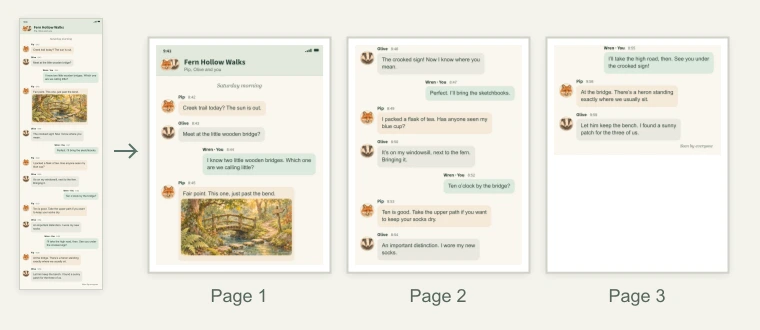
Choose the screenshot and check the page count. The tool fits the image to the printable width, then looks for quiet gaps between lines near the bottom of each sheet. Download the PDF and print it on the paper size shown.
Can I use a full-page iPhone screenshot saved as a PDF?
Yes. Choose a PDF containing one continuous page. You can also use a PNG, JPG, or WebP screenshot. Password-protected PDFs need an unlocked copy.
What if a page break cuts through a message or receipt line?
Go to the page where the cut appears and choose Adjust page break. Drag the line into a gap or move it with the arrow keys. Apply the break to see how the remaining pages fit.
How can I share a long screenshot with an AI chat?
Choose Save as images and unzip the download. The numbered PNGs run from top to bottom and keep the width of an image input. Attach the sections you need in order. For PDF inputs, the PNGs are rendered images.